Young-child programs increasingly balance hands-on, real-world play with digital tools. This article gives directors and providers clear, evidence-informed strategies for setting daily limits, choosing purposeful content, creating screen-free routines, guiding staff practices, and partnering with families so technology supports rather than replaces conversation, movement, relationships, and active learning. It also includes short action steps, sample routines, and practical ideas programs can apply immediately. To strengthen these practices, explore ChildCareEd’s self-paced online course Technology as a Classroom Tool  Buy Now $16.00, which examines how media affects young children’s development and offers strategies for guiding technology use in early learning environments. Programs and families can also use ChildCareEd’s family media plan guidance and simple screen-time rules to create consistent expectations across home and care. Remember that state requirements vary, so always check with your state licensing agency.
Why it matters: 1) Early growth depends on talk, movement, and hands-on #play; 2) Excessive or poorly timed #screentime can harm sleep, language, and social skills; and 3) Thoughtful, short uses led by adults can add value to classroom routines. You will see links to CDC, AAP/Nemours summaries, systematic reviews, and ChildCareEd classroom resources so you can adapt policy to your setting. Remember: state requirements vary - check your state licensing agency.
1. What evidence-based age rules and daily limits should our program use?
- 📌 Infants Nemours KidsHealth).
- 📌 18–24 months: introduce only very short, high-quality content and always co-view with an adult so meaning and language are supported (ChildCareEd guidance).
- 📌 Ages 2–5 in group care: plan 1–2 short, teacher-led screen moments per day (about 10–15 minutes each) for songs, movement, or story time; pair each session with hands-on follow-up (CDC HIOPS).
- 📌 Mealtimes, snacks, and nap/quiet times: no screens. Background media reduces adult-child talk and learning (AAP summary).
Why keep it simple? The evidence base — including systematic reviews and public-health guidance — shows that age, timing, and content matter more than device brand. For population-level limits and obesity-prevention standards, see the CDC HIOPS recommendations above, and for program-level tweaks, use ChildCareEd templates (family media plan).
2. How can short screen moments become meaningful teaching moments?
- 🎯 Plan the goal (1 sentence): pick a single learning target (vocabulary, rhyme, movement sequence).
- 👥 Co-view and narrate: sit with children, label items, ask 1–2 simple prompts, and model talk that links screen images to real objects or classroom play (Incorporating Technology).
- 🎨 Follow with hands-on practice: within 2 minutes of stopping the video, lead an activity that uses the same words or motions (song, art, block challenge).
Practical staffing tips:
- 📋 Put every screen use on the daily plan and time it (10–15 minutes for group videos).
- 🔍 Preview and approve content before use; maintain an "approved" short list of apps/videos.
- ⏱️ Use a visible timer and give a 2-minute warning before stopping.
3. How do screens affect sleep, language, and behavior — and what can we do?
- 😴 Sleep: stop screens 30–60 minutes before naps or bedtime; replace with quiet songs, books, or dim-light routines (AAP guidance).
- 🗣️ Language: background TV reduces adult talk and vocabulary exposure; co-viewing and shared reading are stronger predictors of language gains (CDC positive parenting).
- ⚖️ Behavior & attention: long or fast-paced content increases overstimulation; use brief movement breaks and calming transitions after media.
If you notice persistent sleep or behavior changes after implementing limits, suggest a health or developmental check and partner with the family. For practical, evidence-based strategies you can share with families and adapt in your program, see Cracking the Code of Children's Sleep (And Your Sanity). Also: state requirements vary - check your state licensing agency.
4. How can we avoid fights and build strong family partnerships?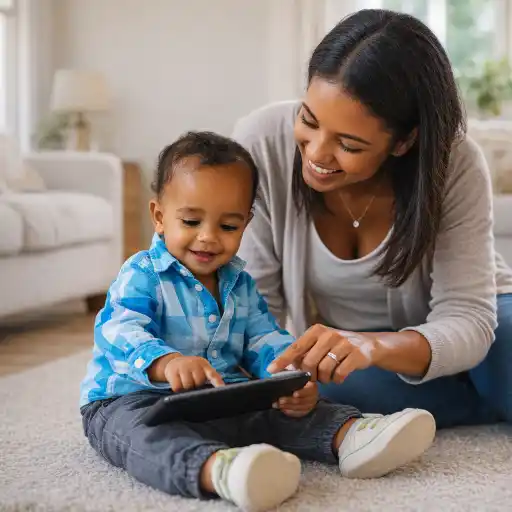
Conflict often comes from unclear expectations. Use a short family-facing policy and a one-page media agreement so everyone shares the same rules. ChildCareEd offers step-by-step guides and parent handouts to make this easier (Family Media Plan).
- 📣 Share one-page center policy: age rules, daily limits, and alternatives (books, outdoor play).
- 🤝 Create a simple family media agreement with checkboxes (home rules, bedtime cutoff, co-view expectations).
- 👩🏫 Offer brief demos: show families 5-minute co-viewing + follow-up so they see how media links to play (stop battles guide).
Common mistakes and fixes:
- 📺 Mistake: background screens during free play. Fix: turn them off — attention and talk go up immediately.
- 🎮 Mistake: screens used as a default calm-down tool. Fix: teach quiet songs, breathing, and book-based routines instead.
- 🔁 Mistake: no follow-up activity. Fix: always plan a hands-on extension that reinforces the screen lesson.
5. What program policies, tools, and staff routines support consistent practice?
Adopt a layered approach: policy (one-page family-facing), staff training (co-viewing & transitions), monitoring (use logs), and family partnership. The Community Guide finds that behavioral interventions — especially those that engage families and include tracking — reduce recreational screen time effectively (Community Guide).
- 🧭 Policy: post your one-page media rules in the classroom and in enrollment packets. Include the phrase: "state requirements vary - check your state licensing agency."
- 📚 Training: teach staff co-viewing techniques, brief transitions, and how to lead follow-up activities (ChildCareEd training ideas).
- 📈 Monitoring: keep a weekly log of screen minutes and learning goals so you can spot overuse and adjust.
- 🔗 Tools: maintain an approved app/video list and simple parent handouts; use timers and visible cues for transitions.
Programs that pair family-based support, teacher coaching, and simple monitoring get the best results. For large-scale program design and state-level strategies, see CDC's ECE strategies (Strategies for Early Care and Education).
FAQ — quick answers for busy directors
- Q: Can we use tablets for small-group learning? A: Yes — if sessions are short (10–15 minutes), adult-led, and followed by hands-on activity (see tips).
- Q: Are video calls okay for infants? A: Yes. Live video chatting with family is an exception for infants and helps attachment (Nemours).
- Q: How do we handle a parent who wants more screen time at home? A: Share your center policy, provide a one-page family media plan, and offer alternatives like co-viewing demos (ChildCareEd).
- Q: What about background TV in the classroom? A: Turn it off — background media reduces talk and learning at every age (AAP summary).
Conclusion
Practical, healthy screen-time practice for early childhood centers rests on five essentials: 1) simple age-based rules, 2) short teacher-led uses with clear goals, 3) co-viewing plus hands-on follow-up, 4) consistent family partnership, and 5) staff training plus monitoring. Start with a one-page policy and a family media plan, train staff in co-viewing, and log uses for a month to see patterns. For classroom templates, parent notes, and staff courses, prioritize ChildCareEd resources (ChildCareEd), and consult CDC, AAP/Nemours, and systematic reviews for the evidence. Remember: state requirements vary - check your state licensing agency. Thank you for the care you provide — small, consistent steps make screens work for children, not against them.
When screens are used, adults must lead. Turn each media moment into a 3-step micro-lesson, so children transfer learning off-screen. This is the approach ChildCareEd recommends in their piece on balancing media and hands-on learning (Balancing Screen Time).Research links evening and bedroom screen access to poorer sleep quality and shorter duration; a major review recommends minimizing evening use and removing bedroom screens to protect sleep (Canada systematic review). Use simple, numbered rules so staff and families know the baseline. Make this a one-page policy you post on the family board and in your enrollment packet; ChildCareEd has ready templates and examples you can adapt (see practical limits).
- Recognize, Respond, Respect: Supporting Diverse Learners
- CDA Preschool Credential
- Balancing Physically Active Play in Child Care
- CDA Family Child Care Credential
- CDA Infant/Toddler Credential
- Birth to Five CDA Credential with Portfolio Review
- CDA Family Child Care Credential with Portfolio Review
- Emergent Learning & Development
- Texas Director Credential
- Balancing Active Play in Child Care
- Kickstart a Healthy Routine for Kids That Actually Sticks Past January
- Mental Health for Tiny Elves: Supporting Kids Through Winter Blues
- Dopamine in Kids: What It Means and How to Support Healthy Habits
- ¿Cómo afecta la dopamina a los niños: señales, efectos e influencias diarias?
- How does the brain develop in early childhood?
- What are the infant care best practices Minnesota child care providers should follow?
- Canciones, juegos y preguntas de círculo para niños
- Dopamine in Children: Rewards, Motivation, and Behavior
- What Is Dopamine? A Simple Explanation for Kids and Parents
- What are practical, healthy screen-time practices for young children?
- How Does the Brain Develop During the First Five Years?
- How can we run a 'Movie Day' that balances screen time and learning in child care?
- How can child care programs balance screen time, educational technology, and active-learning alternatives?
- How can my program set healthy screen-time limits that actually work?
- Why do children need more boredom and less constant entertainment?
- How can early childhood educators effectively teach digital citizenship to young children?
- How can child care programs effectively support school-age children's social and emotional development?
- How Can Child Care Providers Build Healthy Habits for Young Children?
- How Much Screen Time Is Appropriate for Preschool Children?
- Screen Time in Preschool: How Can Teachers Tell Whether Technology Supports Learning?
