Young children enter programs with screens already part of their world. Directors and providers face a practical question every day: how do we use technology to strengthen learning without letting passive media replace the sensory, social, and movement-driven experiences that build early brains? This article gives clear, evidence-informed recommendations, classroom strategies, and family-partnership steps you can adopt tomorrow. It highlights practical alternatives that encourage #activelearning and supports staff confidence in using #educationaltechnology well.
Why it matters:
1) Children’s brains develop through interaction, movement, and hands-on play; excessive or poorly chosen media can displace those experiences and affect language, attention, and sleep (see coverage of recent findings summarized by the New York Times). 2) Behavioral interventions that reduce recreational screen time improve activity and weight outcomes and can be effective when combined with family supports (Community Guide). 3) Thoughtful tech integration can boost teacher practice and family communication when it’s purposeful and staff are trained (RAND).
What are current, evidence-based screen time recommendations for young children?
Short answer: minimize passive screens for infants and toddlers, keep preschool group uses brief and purposeful, and never replace meals, naps, or free play with media. Use these numbered guidelines in staff handbooks and family notes.
- 👶 Infants (under ~18 months): avoid screen media except for live video calls with caregivers or relatives. This follows developmental guidance summarized on ChildCareEd and medical reviews.
- 🧸 Toddlers (18–23 months): allow only very short, high-quality clips and always co-view with an adult who names, models, and expands vocabulary.
- 🎵 Preschoolers (2–5 years): use screens only for specific instructional goals—movement breaks, songs, or short story videos—and limit group viewing to roughly 10–20 minutes followed immediately by a hands-on extension (see practical limits in the CDC HIOPS guidance CDC).
- 🚫 Meals, snacks, and nap/quiet time: screens off. Background media reduces conversation and learning.
- 📝 Monitor and record: keep a simple daily log of screen minutes so you can check patterns with staff and families.
Evidence to cite: systematic reviews show reduced recreational screen time improves physical activity and some diet/weight outcomes (Community Guide) and longitudinal studies link heavy early exposure to developmental delays in communication and problem-solving (JAMA Pediatrics summary).
How can educational technology be used intentionally in early childhood classrooms?
Short answer: make tech teacher‑facing when possible, keep student-facing uses short and interactive, and always pair digital moments with real-world follow-up. Follow these actionable steps.
- 📌 Define purpose: before opening any app, ask: What vocabulary, social skill, or movement will this promote? Align tools to learning goals as advised in ChildCareEd’s technology integration guidance.
- 🧑🏫 Prioritize teacher-facing tools for planning, family communication, and assessment—these reduce administrative burden and free teacher time for interaction (see RAND findings on teacher-facing ed tech use: RAND).
- 👥 Co-use and scaffold: for any child-facing tech, sit with children, narrate, ask open questions, and prompt movement or imitation—co-viewing helps transfer learning off-screen (Balancing Screen Time).
- 🔁 Always follow up: a 10–15 minute video should be followed by 15–30 minutes of play, art, or movement t
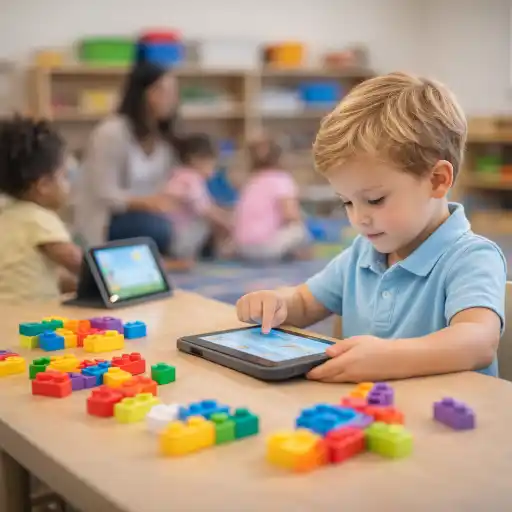 hat practices the same concepts.
 - 📚 Invest in staff learning: teachers who receive training judge ed tech quality better and use tools more effectively—plan short PD sessions using ChildCareEd resources (Technology as a Classroom Tool resources).
What active-learning alternatives reduce passive screen use and boost engagement?
Short answer: replace passive media with movement-rich, sensory, and project-based activities that target the same learning goals. Here are tested alternatives you can implement quickly.
- 🎨 If the screen showed a story or character: do a dramatized retell, puppet play, or small-group storyboard—this deepens language and narrative skills.
- 🧩 For counting or sorting apps: move to tactile sorting (buttons, beads, blocks) and math games with peer collaboration.
- 🚶 For movement videos: lead a guided obstacle course or movement stations outdoors—CDC notes outdoor play’s benefits for health and attention (CDC Outdoor Play).
- 🔬 For science videos: start a short inquiry project (planting seeds, water experiments, building marble runs). Project-based approaches support STEM dispositions in young children (STEM in the Early Years). For programs that want structured units, adult-guided templates, and assessment-aligned activities you can adopt immediately, consider a project-based learning course for early childhood providers (project-based learning course for early childhood providers).
- 📦 Use low-tech “unplugged” digital literacy: robotic kits, sequencing cards, and game-based challenges teach computational thinking without screens (OECD recommends unplugged options as part of digital literacy strategies: OECD).
How do we partner with families and follow policies so everyone supports healthy media use?
Short answer: create a short family media plan, communicate the why, train staff to co-view, and make rules predictable. Keep policy tools simple, shared, and kind.
- 📄 Build a one-page family media plan using the checklist approach in ChildCareEd’s media plan guide. Include age rules, device zones, co-view expectations, and a short family agreement.
- 📣 Communicate the rationale: explain impacts on sleep, language, and play—link families to trusted guidance (CDC, AAP summaries, and ChildCareEd resources). State requirements vary - check your state licensing agency.
- 🤝 Offer quick demos at pickup: show families the hands-on activity that follows a screen moment so they see the learning loop in action.
- 🔒 Address privacy and safety: require consent for photos, use secure family-communication platforms, and preview apps before recommending them (ChildCareEd on best practices).
- 📈 Track and review: share monthly summaries of screen minutes and learning goals with families; celebrate reductions or stronger follow-up activities.
How do we avoid common mistakes and measure whether our approach works?
Short answer: avoid background media, don’t use screens as default calming tools, preview content, and use simple measures to track outcomes.
- 🚫 Common mistakes and fixes:
- 📺 Mistake: background TV during play. Fix: turn off background media to increase talk and attention.
- 🧸 Mistake: screens as calming routines. Fix: teach alternate calming strategies (books, songs, deep-breathing, heavy work).
- 👀 Mistake: unvetted apps. Fix: maintain an approved list and assign one staff member to preview content; use ChildCareEd resources for vetting (free resources).
- 📊 Easy measures to monitor impact (small and practical):
- 🔢 Weekly screen-minute log per classroom.
- 🗣️ Simple language plus-play checklist after screen sessions (did staff co-view? was there a hands-on extension?).
- 🛌 Sleep/behavior notes: ask families to note any changes in sleep or behavior after increased screen exposure.
- 🔁 Continuous improvement: review logs monthly, celebrate small wins, adjust plans based on patterns, and share results with staff and families.
Summary and FAQs
Summary: Use screens sparingly and purposefully; prioritize co-viewing and immediate hands-on extensions; replace passive media with sensory, movement, and project-based alternatives; partner with families via a short media plan; and measure impact with simple logs and checklists. For ready templates and training, see Balancing Screen Time with Hands-On Learning and ChildCareEd’s course materials (Technology as a Classroom Tool resources).
FAQ:
- Q: Can we use tablets for individualized learning? A: Yes—if use is brief, adult-led, follows a clear learning goal, and includes a non-screen extension (ChildCareEd).
- Q: Are video chats allowed for infants? A: Yes—live video with family is developmentally appropriate for infants; keep it interactive and supervised.
- Q: How long is too long for preschoolers in group care? A: Aim for single sessions of 10–20 minutes and limit total quality media to brief, purposeful uses across the day—CDC and ChildCareEd suggest tight limits (CDC).
- Q: How do we handle families who want more screen time at home? A: Use a collaborative family media plan, explain the "why," and offer concrete alternatives and brief demos at pickup (ChildCareEd).
- Q: Where can staff get short PD on this topic? A: Use ChildCareEd courses and free resources on tech integration and intentional engagement (ChildCareEd resources).
You are not alone—small, consistent rules and a strengths-based approach to technology will protect children’s sleep, language, and play while letting you use devices as tools, not babysitters. Keep the day full of real people, movement, and discovery. #screentime #educators #families #playbased #activelearning
- 45 Hour Child Growth and Development
- Balancing Physically Active Play in Child Care
- CDA Bridge Bundle: Family Child Care without Portfolio Review
- CDA Bridge Bundle: Infant/Toddler without Portfolio Review
- CDA Bridge Bundle: Preschool without Portfolio Review
- Texas Director Credential
- Balancing Active Play in Child Care
- Technology as a Classroom Tool
- CDA Certification en Español: Recursos y Consejos para Educadores Bilingües
- Recursos en Español sobre el Sueño Seguro del Bebé
- ¿Cómo afecta la dopamina a los niños: señales, efectos e influencias diarias?
- Proporciones de Cuidado Infantil y Tamaños de Grupo por Edad en Virginia (Guía Rápida para Centros y Hogares)
- Canciones, juegos y preguntas de círculo para niños
- How to Balance Screen Time and Learning in the Classroom
- How can North Dakota child care balance technology and play?
- Can technology help preschool classrooms teach better?
- How can child care programs balance screen time, educational technology, and active-learning alternatives?
- What Does the CoComelon Debate Mean for Providers — How Should We Manage Screen Time for Toddlers?
- Can Early Childhood Programs Use Technology Responsibly to Enhance Learning?
- How Can Child Care Programs Balance Technology with Hands‑On Learning?
- What Should Teachers Know About Screen Time in Child Care?
- How Much Screen Time Is Appropriate for Preschool Children?
- What Are Educational Apps Replacing in Preschool—and What Should They Replace?
- What Do Children Enjoy About Screens—and How Can Their Answers Inspire Better Alternatives?
- How Are Digital Portfolios Changing the Way Teachers Document Children’s Learning?
- Personalized Learning in Preschool: Where Can Technology Help—and Where Should It Stop?
- The Child Care Classroom of the Future: Which Technologies Are Actually Worth Using?
- Screen Time in Preschool: How Can Teachers Tell Whether Technology Supports Learning?
