When a child can listen to a story instead of decoding every word—or share an idea aloud instead of struggling with a keyboard—more ways to participate open up. Explore how text-to-speech (TTS) and speech-to-text (STT) can reduce classroom barriers, and consider [Building Equity: Inclusionary Practices in Preschool]) for practical strategies to make everyday learning more accessible. For a broader look at guiding technology use in early learning, [Technology as a Classroom Tool  Buy Now $16.00] offers a useful professional-learning next step.
What are text-to-speech and speech-to-text tools, and why do they matter?
Text-to-speech converts digital or typed words into spoken audio; speech-to-text captures spoken language and turns it into written text. Depending on a child’s needs and the activity, these tools may offer another route to understand information, communicate, or demonstrate learning. They are examples of accessibility features within assistive technology, alongside captions, communication devices, and other supports.
The purpose is not to make every child use a device. It is to identify barriers and provide tools that help children take part with greater independence. A child who finds decoding difficult may listen while following highlighted text. A child whose motor needs make writing tiring may dictate a response. A child who is developing English may benefit from listening to a word while seeing it on the page. The tool should support the learning goal, not replace meaningful interaction, play, or educator guidance.
For young children, technology works best as part of responsive teaching: an adult introduces it, models its use, and observes whether it genuinely helps. Assistive technology can support participation across daily routines, play, language, and early literacy—not only formal academic tasks.
How can TTS and STT help children participate in daily learning?
TTS and STT can create flexible ways to access and express ideas. A teacher might use TTS during a shared digital story, allowing children to hear a sentence while tracking its words. STT may help a child dictate an observation about a science activity or tell a story before attempting to write it down. These approaches can lower barriers related to reading, writing, communication, vision, or motor access, though the right support varies by individual.
- Literacy access: TTS can read digital text aloud; children may listen and follow along, pause, or replay a passage.
- Idea expression: STT can capture a child’s spoken ideas when handwriting or keyboard use is a barrier.
- Language experiences: TTS can provide another opportunity to hear vocabulary and pronunciation, while educators connect words to objects, gestures, and conversation.
- Group participation: A shared tool can be modeled during a group activity, making accessibility features familiar rather than singling out one child.
These are options, not guaranteed outcomes. Research on speech-to-text and writing suggests potential for children facing transcription difficulties, while evidence and effectiveness can vary by learner, task, and tool. In early childhood settings especially, educators should keep activities social, hands-on, and developmentally appropriate. A screen can support a story or record an idea, but it should not displace the conversation, drawing, block play, or exploration that gives the idea meaning.
How do you choose a tool that fits a child and a classroom activity?
Start with the child’s strengths, preferences, and the specific barrier—not with a favorite app or device. Ask what the child is expected to do, what makes participation difficult, and what other supports are already helping. A tool that works well for listening to a short story may not be suitable for dictating a noisy group discussion. Built-in accessibility settings on tablets and computers may be enough for a simple trial; specialized software may be appropriate for more specific needs.
Whenever possible, invite the child to try options and share what feels comfortable. Coordinate with the family and, when involved, the child’s speech-language pathologist, educational audiologist, occupational therapist, special educator, or assistive-technology specialist. ASHA recommends a collaborative, individualized approach that includes observation, trials, team input, and ongoing review. If support is part of an IEP or Section 504 plan, follow the documented arrangements and communicate with the relevant team.
- Match the tool to a clear learning or participation goal.
- Check that it works with the child’s language, communication style, motor access, and sensory preferences.
- Try it during the real classroom activity and observe whether it improves access.
- Plan how the child can use it across routines, not only during a one-time demonstration.
Educators can deepen their planning skills with Tailoring Instruction to Children’s Needs Buy Now $24.00, which focuses on adapting instruction and scaffolding for children’s individual needs.
What does effective classroom use look like in practice?
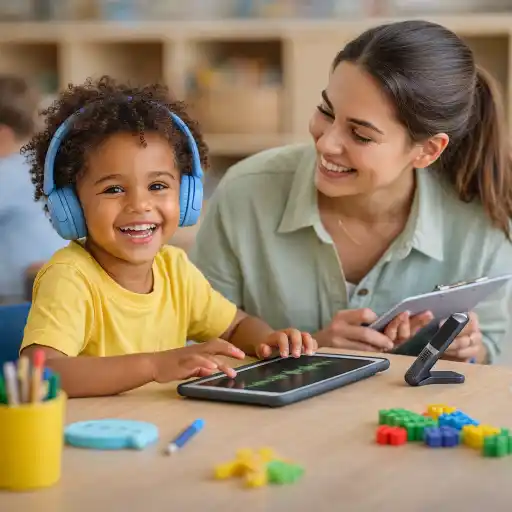
Introduce tools naturally and explicitly. Show children how to start, pause, replay, dictate, and correct a transcription. Keep instructions simple, model the feature during an ordinary activity, and allow time for practice before expecting independent use. A child may need to learn how to speak clearly toward a microphone, select a section of text, or tell the device when to stop; these are skills that develop with supported practice.
Integrate access features into predictable routines. For example, offer TTS as one choice during a quiet book response, or let children dictate a caption for a drawing. Provide headphones when appropriate, but make sure children can still hear directions and participate socially. Keep a non-digital option available so each child can choose a comfortable way to engage.
- 🎧 Preview the tool and content, check volume and privacy settings, and reduce background noise for speech recognition.
- Model the tool to the whole group when useful, without requiring every child to use it.
- Pair listening or dictation with a meaningful response: conversation, drawing, movement, or hands-on play.
- Check the output together; speech recognition can mishear words, accents, or young children’s speech.
- Observe whether the child is more engaged, independent, or able to show understanding—and adjust if not.
Accessible materials matter as well as accessible software. Use clear headings and logical reading order in digital documents, and add concise descriptions to meaningful images. If content is poorly structured, a reader may not present it in the intended sequence. Keep the tool in service of the activity and the child’s agency.
What challenges should providers anticipate and address?
These tools can be helpful, but they are not flawless. Speech recognition may produce errors, especially with background noise, unfamiliar vocabulary, multilingual speech, or a child’s developing articulation. TTS voices and reading controls also differ in quality and usability. A transcription should not be treated as a perfect record, and children should not be judged on a tool’s mistakes.
Privacy and equitable access also deserve attention. Review what information an app collects, whether speech is stored or processed online, and who can access recordings or documents. Follow program policies and applicable privacy requirements, obtain required permissions, and avoid entering sensitive child information into unapproved tools. Consider device availability, connectivity, and whether the same support can be offered reliably across settings.
Avoid treating technology as a substitute for assessment or human support. If a tool seems ineffective, check whether the problem is the setting, the device, the activity, or the match to the child’s needs. Consult families and relevant specialists rather than assuming a child is unwilling or unable. For children with identified supports, coordinate changes with the appropriate team. State requirements vary - check your state licensing agency.
- Common pitfall: Introducing a tool once and expecting independent use. Better approach: teach, practice, and revisit it as part of routine learning.
- Common pitfall: Assuming an automated transcript is accurate. Better approach: review and correct it with the child when appropriate.
- Common pitfall: Using a device without a learning purpose. Better approach: connect it to a participation goal and offer meaningful alternatives.
How can providers build an inclusive, sustainable approach?
Successful use depends on preparation and teamwork, not simply having the newest device. Agree on which tools are available, who can help troubleshoot them, how staff will support the child, and how the team will evaluate whether the tool is useful. Share observations with families in respectful, specific language: describe the activity, the support offered, and what the child was able to do. Invite family knowledge about communication preferences and familiar technology.
Directors can support consistency by providing staff time to learn the tools, documenting procedures, and ensuring accessible materials are considered during planning. Where a child has an IEP or Section 504 plan, coordinate with the relevant team and follow the plan. The goal is not technology for its own sake; it is a flexible classroom where children can access shared experiences in ways that work for them.
For a focused look at inclusion in preschool routines, explore Building Equity: Inclusionary Practices in Preschool Buy Now $10.00. Providers who want to extend their learning about individual supports may also consider Special Needs: From Referral to Inclusion Buy Now $24.00 or Technology as a Classroom Tool Buy Now $16.00. Course details, available training hours, and applicable requirements should be checked directly with ChildCareEd and the relevant licensing agency.
Conclusion: How can TTS and STT support inclusion?
Text-to-speech and speech-to-text can give children additional ways to access information and express ideas. Their value comes from a thoughtful match between the child, the activity, and the tool—along with modeling, practice, family and specialist collaboration, and attention to privacy and accuracy. Begin with a participation goal, offer the tool as a supportive option, and observe whether it helps the child engage with peers and learning.
Above all, accessible technology should expand children’s choices, not define their abilities. With intentional planning, TTS and STT can be part of a welcoming classroom where each child has a meaningful route into shared learning.
- CDA Home Visitor Subject Area 3 Part 3 Birth to 5
- Building Equity: Inclusionary Practices in Preschool
- Birth to Five CDA Credential with Portfolio Review
- Open Ears: Listening in Child Care
- Setting the Stage: Story Time
- Art from the Heart for Preschoolers: Open Ended Art Projects that Build Self-Esteem
- Building Bridges for Dual Language Learners
- Wellness in Action: Teaching Healthy Habits to Children
- Inclusive Montessori: Supporting Diverse Learners in the Classroom
- Bridging Cultures: Family Communication & Collaboration
- CDA Certification en Español: Recursos y Consejos para Educadores Bilingües
- 💛🧩 ¿Cómo puedo hacer que mi enseñanza sea inclusiva para los niños con autismo?
- Proporciones de Cuidado Infantil y Tamaños de Grupo por Edad en Virginia (Guía Rápida para Centros y Hogares)
- Apoyo en Preescolar para Retrasos del Habla: Estrategias Simples que Ayudan
- Retraso del Habla en la Guardería: Cómo Pueden Ayudar los Proveedores
- How can we support California children with special needs using play, pictures, and positive language?
- How can I support children with special needs in my child care program?
- Belonging Activities for Kids Who Feel Left Out: Simple Ways to Help Them Join In
- How Can Picture Task Cards Support Emerging Readers?
- How Can Printable Books Help Preschoolers Fall in Love With Reading?
- How Can You Support an Autistic Child in a Preschool Classroom?
- How Can Recipe Sequences Build Comprehension and Oral Language in Preschool?
- How Can Predictable Text Reinforce Shape Concepts in Preschool?
- How Can Child Care Providers Preserve a Child’s Exact Words During Story Dictation?
- How Can We Help School-Age Children Explain the Facts They Copy?
- Is a Beginning Reader Decoding or Guessing from Pictures?
- How Can You Use AI to Turn a Book Into a Full Week of Preschool Learning?
- How Can Text-to-Speech and Speech-to-Text Tools Support Inclusive Classrooms?
- How Can Technology Make Classroom Materials More Accessible?
