The debate surrounding CoComelon, YouTube recommendation systems, and AI-generated children’s videos is no longer limited to parenting forums—it has become a practical concern for child care directors and teachers. Popular videos may be convenient and engaging, but providers must weigh those benefits against possible overstimulation, reduced conversation and active play, disrupted rest routines, advertising, and algorithm-selected content that has not been reviewed by early childhood educators. This article translates the debate into clear, classroom-ready strategies for limiting passive viewing, previewing all content, defining an educational purpose, co-viewing with children, and immediately extending short media experiences through conversation, movement, art, or hands-on play.
To strengthen your program’s approach, explore ChildCareEd’s self-paced online course Technology as a Classroom Tool  Buy Now $16.00. The training helps early childhood professionals examine how media affects children’s development and use technology intentionally to enhance learning rather than replace responsive relationships and real-world exploration. ChildCareEd also recommends keeping media use brief and planned, having an adult actively participate, and following each digital experience with meaningful off-screen learning. State requirements vary, so always check with your state licensing agency.
Why this matters :
1) Popular kids' content reaches huge audiences quickly and can include AI‑generated or algorithmic variants that are visually intense or misleading — see reporting on how A.I. is distorting children’s feeds in The New York Times and industry coverage showing YouTube’s scale and safety tradeoffs (Bloomberg / Yahoo).
2) Research and reviews link heavy early exposure to weaker language outcomes and sleep problems — see practical summaries and classroom guidance at ChildCareEd and findings summarized by public health resources like Nemours KidsHealth.
What is the CoComelon debate — and why should providers pay attention?
1) In plain terms: CoComelon and similar channels are extremely popular, but algorithmically served content may include fast edits, repetitive hooks, or AI variants that keep toddlers watching longer and deliver less adult interaction. See reporting on algorithm risks in The New York Times and the marketplace analysis at Yahoo/ Bloomberg.
2) For providers, this matters because group care should maximize face‑to‑face talk, movement, and play. Over-relying on viral children’s clips risks:
- Reduced staff-child conversation time (language loss).
- Higher group restlessness after overstimulating clips (behavioral effects).
- Sleep delays if families use similar content at home near bedtime.
3) What to do now: treat popular clips like any media tool — short, planned, co‑viewed, and followed by hands‑on activity. For classroom strategies and evidence‑based limits, see ChildCareEd’s guidance on practical screen time limits and balancing screen time with hands‑on learning. Keep the conversation with families positive and practical — state requirements vary; check your state licensing agency.
How does screen content like CoComelon affect toddler learning, sleep, and behavior?
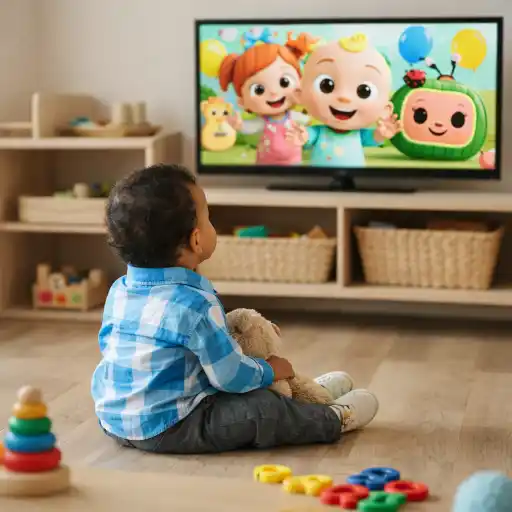
1) Key developmental links (numbered):
- 👶 Language: Studies tie greater screen minutes for very young children to fewer adult words heard, fewer conversational turns, and slower expressive language (see synthesis referenced by ChildCareEd and research summaries such as the JAMA‑summary in public press; see ChildCareEd).
- 😴 Sleep: Screens before nap/bedtime shorten and fragment sleep — stop screens 30–60 minutes before rest and create calming, screen‑free routines (see ChildCareEd on sleep).
- ⚖️ Attention & behavior: Fast‑paced or autoplayed videos may overstimulate toddlers, making transitions and calm periods harder.
2) Why providers can blunt these effects: short, adult‑led media moments create opportunity for language scaffolding and transfer of learning into play — a core recommendation across ChildCareEd resources like Balancing Screen Time with Hands‑On Learning. For an exploration-centered perspective on this balance, see the Montessori approach to screen time and exploration. Also use family messaging to reduce evening screen exposure at home.
When is screen time developmentally appropriate for toddlers in group care?
Use these simple, numbered age rules so staff and families can easily follow them:
- 📌 Under 18 months: avoid screens except for live video chats with family — prioritize face‑to‑face interactions (ChildCareEd limits, Nemours).
- 📌 18–23 months: if used, keep clips very short, co‑view, and target one word or movement.
- 📌 2–5 years (group care): limit to brief, purposeful sessions — aim for 10–15 minutes for a specific teaching goal and always follow with hands‑on extension (ChildCareEd on balancing tech).
Note: Keep meals, snacks, and nap rooms screen‑free; background media reduces talk. Also: state requirements vary - check your state licensing agency.
How can providers make short screen moments high‑quality, safe, and resistant to algorithmic junk?
Follow this five‑step routine every time your program uses media:
- 🔎 Plan the goal: pick one measurable target (vocabulary, song action, counting) and schedule the media moment on the daily plan (ChildCareEd guidance).
- 👥 Co‑view and narrate: sit with children, label items, ask 1–2 simple questions, and connect content to classroom life.
- 🎨 Follow immediately with hands‑on work: art, blocks, dramatization, or a movement game that practices the same idea — this promotes transfer off the screen.
- 🔒 Vet content and block autoplay: maintain an approved content list, preview for fast cuts or AI distortions (see reporting on AI and content distortions in The New York Times), and remove ads/autoplay settings.
- 📋 Log and review: track minutes per classroom and whether staff co‑viewed and led a follow‑up; review patterns monthly and adjust.
Why this works: Teacher presence turns passive viewing into interactive language opportunities, reducing the developmental risk of passive exposure.
How do we respond to parents who request CoComelon or similar shows for comfort or behavior control?
1) Use a strengths‑based, collaborative approach. Start by listening: validate the parent's goal (comfort, routine, or convenience) before explaining program practice.
- 📣 Share your short, one‑page media policy (age rules, device zones, co‑view expectation). Use the ChildCareEd policy template for ideas: How to write a screen‑time policy.
- 🤝 Offer a family media plan: simple checkboxes for home limits, co‑viewing, and bedtime cutoff. Invite families to try a 7‑day swap: replace one evening clip with 15 minutes of shared book reading or a family song routine.
- 🚫 Demonstrate alternatives: show a short classroom demo at pickup — play the 10‑minute clip, then show the hands‑on follow‑up so families see learning in action.
- 📈 Monitor results: if behavior or sleep improves after reduced evening viewing, share wins with families. If problems persist, suggest checking with health or development professionals.
Keep messages concrete and brief. Many families want an easy rule—give them one: short, co‑viewed, followed by play; stop before bed. State requirements vary - check your state licensing agency.
What common mistakes should programs avoid — and how do we measure whether our approach is working?
Common mistakes (and quick fixes):
- 📺 Mistake: background TV or autoplay during play. Fix: turn off background media to boost adult‑child talk and engagement.
- 🎮 Mistake: using screens as a default calming tool. Fix: teach quiet routines (books, soft music, breathing) and reserve media for explicit teaching goals.
- 👀 Mistake: unvetted, fast‑paced content (including AI variants). Fix: keep an approved list and assign one staff member to preview new uploads.
- 🧾 Mistake: no hands‑on follow‑up. Fix: require a planned extension activity after every screen moment.
Simple measures to track impact (numbered and practical):
- 🔢 Weekly screen‑minute log per classroom (minutes and context).
- 🗣️ Quick language checklist after media: Was staff present? Did they ask questions? Was there an extension activity? (Yes/No).
- 🛌 Family sleep/behavior note: a one‑line daily note for two weeks after a plan change to see trends.
Use data for improvement: review monthly, celebrate small wins with staff and families, and adapt rules if patterns show overuse or sleep problems. For why interaction matters and how children’s daily experience shapes quality, see the classroom perspective research at ECRP and ChildCareEd's practice posts.
Summary — what to adopt this week
- 📝 Post a one‑page media policy with clear age rules and device zones (sample).
- ⏱️ Limit group screen use to planned 10–15 minute breaks for specific goals; avoid screens for under 18 months (practical limits).
- 👥 Require co‑viewing, narration, and a hands‑on follow‑up each time you use media (how to balance).
- 🔒 Vet content (watch for fast edits/AI) and disable autoplay — prioritize vetted public broadcasters and educator‑created clips.
- 🤝 Partner with families using a short family media plan — offer demos and celebrate small changes. State requirements vary - check your state licensing agency.
FAQ (short answers):
- Q: Can we use CoComelon clips for a movement break? A: Yes — if use is short, staff co‑view, and you immediately follow with hands‑on movement or song that reinforces language and motor goals.
- Q: How long is too long in group care? A: Aim for single sessions of 10–15 minutes; log totals and keep daily minutes low (see limits).
- Q: Are video calls okay for infants? A: Yes — live family video chats are an exception and can support attachment when supervised.
- Q: How do we handle AI‑generated junk content? A: Preview, block autoplay, keep an approved list, and prioritize trusted educational sources. See news on AI distortions in The New York Times.
- Q: Where can staff get PD on this? A: ChildCareEd offers courses and short modules on technology integration and intentional engagement — search "Balancing Screen Time" on ChildCareEd.
Thank you for the work you do. Small, consistent rules — short, co‑viewed media moments followed by #play — protect toddlers’ language, sleep, and learning while letting you use screens as intentional tools, not babysitters. The five words to remember: #screentime #toddlers #providers #families #play.
- 45 Hour Child Growth and Development
- Birth to Five CDA Credential with Portfolio Review
- CDA Bridge Bundle: Preschool
- Pediatric RSV First Aid & CPR/AED
- 45 Hour School Age Methods and Materials
- CDA Bridge Bundle: Family Child Care
- CDA Bridge Bundle: Infant/Toddler
- 45-Hour Infant and Toddler Curriculum
- Texas Director Credential
- 😫🧸 ¿Qué hacer cuando un bebé no quiere dormir la siesta en el aula?
- Cómo Abrir Una Quardería En Casa Sin Dinero?
- Recursos en Español sobre el Sueño Seguro del Bebé
- Que es Título 22 en California?
- ¿Cuáles son los pasos, requisitos y opciones en línea para la certificación de 90 horas en cuidado de Infantes/Toddlers en Maryland?
- ¿Cómo afecta la dopamina a los niños: señales, efectos e influencias diarias?
- Capacitación en Salud y Seguridad Preventiva en Línea para Proveedores de Cuidado Infantil
- ¿Cómo solicito la licencia para una guardería en California?
- Regulaciones de Licenciamiento de Cuidado Infantil en California para Centros y Hogares de Cuidado Infantil Familiar
- Normas de Licenciamiento de Cuidado Infantil en Virginia para Centros Diurnos Infantiles y Hogares Diurnos Familiares
- Proporciones de Cuidado Infantil y Tamaños de Grupo por Edad en Maryland (Guía Rápida para Centros y Hogares)
- Proporciones de Cuidado Infantil y Tamaños de Grupo por Edad en Nueva Jersey (Guía Rápida para Centros y Hogares)
- Proporciones de Cuidado Infantil y Tamaños de Grupo por Edad en Virginia (Guía Rápida para Centros y Hogares)
- Lista para Abrir una Guardería en Casa en Virginia: Cómo Empezar
- Lista para Guardería en Casa en Illinois: Cómo Iniciar una Guardería en el Hogar
- Lista para Guardería en Casa en California: Cómo Iniciar una Guardería en el Hogar
- Lista para Guardería en Casa en Texas: Cómo Iniciar una Guardería en el Hogar
- Capacitación Previa al Servicio para Proveedores de Cuidado Infantil en Dakota del Norte
- Canciones, juegos y preguntas de círculo para niños
- What Does the CoComelon Debate Mean for Providers — How Should We Manage Screen Time for Toddlers?
