Keeping staff records organized helps your program stay safe and ready for licensing visits. This guide shows Michigan directors and providers clear steps to track st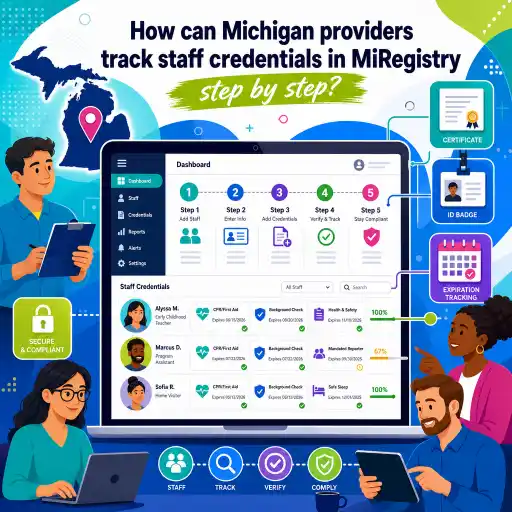 aff credentials in #MiRegistry using #ChildCareEd and other tools. state requirements vary - check your state licensing agency.
Why does tracking staff credentials matter?
Simple reasons it matters (numbered):
- ✅ Safety: Training records show staff know health and safety rules.
- ✅ Licensing: Inspectors look for certificates and proof of learning.
- ✅ Quality: Records help you plan staff growth and program improvement.
Tip: Keep both digital and paper copies so you can show proof fast. ChildCareEd explains how training ties to the MiRegistry in their Michigan guide: How can Michigan childcare providers use MiRegistry and ChildCareEd.
How do I set up MiRegistry IDs and link ChildCareEd accounts?
- 🟢 Create or confirm each staff member has a MiRegistry account. See benefits at Benefits of the MiRegistry.
- 🔢 Collect each person’s MiRegistry ID at hiring and keep the list in personnel files.
- 🖥️ Have staff sign into ChildCareEd and add their MiRegistry ID in their profile so credits post automatically. ChildCareEd explains linking in A Complete Guide to ChildCareEd Courses for Providers in Michigan.
- 📄 After staff finish a course, ChildCareEd posts attendance to MiRegistry (usually within a few business days) — confirm in the registry as described in this guide.
Practical checklist for new hires:
- Collect MiRegistry ID, email, and signed training release.
- Add staff to your ChildCareEd Group Admin (if you use it) so you can assign courses — see How ChildCareEd Group Admin Supports Child Care Compliance.
- Save the ID in both the personnel file and your master tracker.
- 📘 A strong first course to track: A great course for new hires to complete and link to MiRegistry is ChildCareEd's Health and Safety Orientation
 Buy Now
 $55.00$45.00 — a 6-hour online course covering core health and safety standards that count toward Michigan training requirements. Add the staff member's MiRegistry ID before they start, and the completion will post automatically, giving your master tracker its first clean entry.
How do I track course completions, certificates, and upload proof?
- 📥 Verify reporting: Wait a few business days and check the staff member’s MiRegistry record to confirm the course posted. ChildCareEd notes upload timing in their Michigan guide: MiRegistry & ChildCareEd guide.
- 📁 Save proof: Download the PDF certificate from ChildCareEd and save one copy in a locked cloud folder and one in the staff paper file.
- 📊 Master tracker: Keep a spreadsheet or use the Admin Portal report with columns: name, course, date, hours/CEUs, MiRegistry posted (yes/no), expiration.
Weekly 15-minute routine for directors (numbered):
- 🔎 Check portal dashboard for incomplete items.
- 📥 Download any new certificates and save them to both backups.
- 📧 Send gentle reminders to staff who need help finishing courses.
- 🗂️ Program administration and documentation systems: For directors building stronger tracking systems for staff credentials and licensing readiness, ChildCareEd's Early Childhood Program Administration Buy Now
$120.00$100.00 is a comprehensive 32-hour online course covering program management, documentation systems, and administrative best practices — a strong investment for any Michigan director responsible for keeping MiRegistry records, master trackers, and audit-ready files organized. For a broader set of recommended trainings that build provider skills across health, curriculum, and leadership, see Invest in Your Skills, Invest in Children: ChildCareEd Training for Michigan Providers.
How do we avoid common mistakes and prepare for audits?
Common mistakes are easy to fix if you have a routine. Use these numbered fixes and actions so audits feel calm, not chaotic. state requirements vary - check your state licensing agency.
- 😕 Missing MiRegistry IDs — Fix: Collect IDs at hire and verify them during onboarding.
- 📄 Lost certificates — Fix: Save certificates the day a course finishes (cloud + paper).
- ⏰ Last-minute rush — Fix: Spread training across the year; set reminders at 120/90/60/30 days before expirations (use the Admin Portal calendar).
- ❌ Wrong courses — Fix: Choose MiRegistry-approved courses listed on ChildCareEd’s Michigan pages like Michigan Approved Training.
Audit-ready quick plan (3 steps):
- 📥 Confirm MiRegistry postings for the last 6 months.
- 📁 Make a folder with staff certificates, background checks, and signed job descriptions.
- 📊 Print your master tracker report and bring it to the visit.
Conclusion and FAQ
Tracking credentials in #MiRegistry helps your program stay safe, compliant, and confident. Use a step-by-step plan: collect IDs, link ChildCareEd accounts, confirm postings, and keep two backups of certificates. The ChildCareEd Admin Portal can save time — learn more at Group Admin. #certificates
Quick FAQ (short answers):
- Q: Will ChildCareEd post course credit to MiRegistry? A: Yes, when staff add their MiRegistry ID — see ChildCareEd is on the MiRegistry.
- Q: How long until credits appear? A: Usually a few business days after the provider uploads — confirm in the registry (see the complete guide at ChildCareEd course guide).
- Q: What if a course doesn’t post? A: Keep the certificate and contact ChildCareEd support or MiRegistry help — also double-check the MiRegistry ID.
You are not alone. Small, steady steps make tracking easy and keep your program ready. For step-by-step help and links to Michigan pages, start at ChildCareEd’s Michigan guide: A Complete Guide to ChildCareEd Courses for Providers in Michigan.
Follow this short numbered plan to get started. This step is important because if a staff member’s MiRegistry ID is missing, training credits may not post quickly.Use a simple 3-step system directors love: verify reporting, save certificates, and keep a master tracker. ChildCareEd’s Admin Portal makes many of these steps faster; read how at Group Admin. #ChildCareEd #training #staffTracking staff credentials is more than filing papers. It keeps children safe, helps during licensing visits, and shows families your team is trained. Good records: 1) prove training is done, 2) make renewals easier, and 3) help your program get better reviews like Great Start to Quality. For more on why the MiRegistry helps programs, see the overview at Benefits of the MiRegistry. #MiRegistry #training #staff #certificates #ChildCareEd
- 45 Hour Child Growth and Development
- 45-Hour School Age Curriculum
- CDA Preschool Credential with Portfolio Review
- Birth to Five CDA Credential with Portfolio Review
- CDA Family Child Care Credential with Portfolio Review
- CDA Bridge Bundle: Preschool
- CDA Infant/Toddler Credential with Portfolio Review
- Texas Director Credential
- 45 hour Growth and Development Birth-age 12 ONLINE
- ChildCareEd is coming to Michigan!!
- What are preservice trainings in Michigan and how do providers complete them?
- Proporciones de Cuidado Infantil y Tamaños de Grupo por Edad en Maryland (Guía Rápida para Centros y Hogares)
- What are training bundles in Michigan and which one fits your program?
- What's new for child care in Michigan and how does it affect your program?
- What's new in Michigan child care and how can your program prepare?
- Capacitación CDA gratuita en Illinois
- How can earning a CDA in Michigan benefit child care providers and create new opportunities?
- What Does Michigan's Quality Rating System Really Measure and How Can We Improve?
- How does ChildCareEd help Michigan providers move up their Great Start to Quality rating?
- How do Michigan child care providers earn and use a CDA credential?
- How can I earn a CDA in Michigan and use ChildCareEd to complete my coursework hours?
- How Can Family Child Care Homes in Michigan Join the PreK for All Home-Based Pilot?
- How can Michigan providers track staff credentials in MiRegistry step by step?
- Cómo simplificar la capacitación para sus empleados de daycare
- How do I document staff credentials in MiRegistry for Great Start to Quality?
- What should a Michigan preservice training checklist for new child care staff include?
- What Are Michigan's Program Administrator Requirements for Education, Experience, and Training?
- What are Michigan's background check requirements for child care staff?
- What are Michigan's child care credentialing levels and how do they work?
