When a staff member leaves, an outdated automatic reply can leave families unsure where to turn—and important questions about a child’s care may go unanswered. Use the practical audit steps below to update your contact routes, protect privacy, and keep communication dependable; for a deeper foundation in speaking and listening with families, explore A Guide to Effective Communication  Buy Now $16.00, an online course that can strengthen your everyday professional communication skills.
Why does a former employee’s auto-reply matter to families?
For families, a center email address is not just an address: it is a trusted route to someone who knows their child. If an automatic reply names a former teacher or director, a caregiver may reasonably assume that person still handles the classroom, enrollment, billing, or an urgent concern. The result can be delays, repeated messages, and uncertainty at exactly the moment families need a clear answer.
Staff transitions are a normal part of program operations. What matters is whether the transition preserves continuity and keeps families informed. A reliable contact route signals that the program is organized, responsive, and attentive to family needs. It also reduces the risk that staff spend time untangling messages sent to an inbox nobody monitors.
Think of an automatic reply as part of your center’s public-facing communication system, not a leftover personal setting. Its wording should be accurate, brief, welcoming, and consistent with your current policies. Strong #communication helps preserve #trust even when familiar staff members move on, while clear #roles help families know who can answer specific questions.
- Families can reach an active staff member without guessing.
- Time-sensitive concerns are directed to an appropriate channel.
- Staff avoid sharing unnecessary personnel information.
- The program maintains a consistent, professional voice during change.
What should a family contact route audit cover?
A practical audit checks more than one mailbox. Review every place families might encounter a staff member’s former address or name: automatic replies, email signatures, classroom pages, newsletters, enrollment materials, shared contact lists, the center website, and any family communication platform. A carefully maintained contact route should tell families both whom to contact and which channel to use.
Start with a simple inventory. For each staff departure, identify the responsibilities the person held and the current person or team responsible for each one. One successor may not handle every area. Families may need separate routes for classroom updates, enrollment and billing, health or attendance changes, and general questions.
- Mailbox: Is the former staff address still monitored, retired, or configured to send an approved reply?
- Replacement contact: Does the message provide a current center email address or office number?
- Public materials: Have names and addresses been updated in forms, directories, websites, and templates?
- Ownership: Is a specific administrator responsible for testing and reviewing each change?
- Timing: Is there a review date so temporary messages do not remain indefinitely?
A Family Contact Route and Automatic Reply Audit can make this review repeatable: list each outgoing route, verify the responsible person, record the change, and note when it was tested. Keep the audit focused on operational contact information; it should not become a record of private employment circumstances.
How can you write an automatic reply that redirects families clearly?
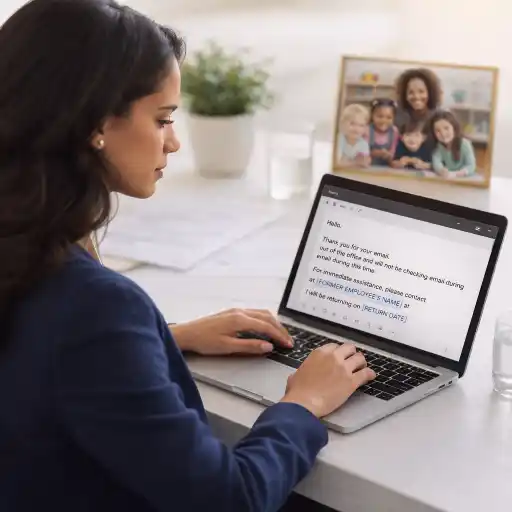
Effective replies answer the sender’s immediate question: Is this person still available, and what should I do next? Keep the tone warm and factual. State that the staff member is no longer the appropriate contact, identify a current person or team, and give a working center email or phone number. If messages are not forwarded, say so plainly rather than letting families assume they will be read.
For example:
Thank you for contacting [Center Name]. [Staff member] is no longer with our program, and this inbox is not monitored for family questions. For classroom updates, please contact [current staff/team] at [center email or phone]. For urgent changes regarding your child’s arrival, pickup, or health today, call [office number]. Thank you for helping us keep communication current.
Customize the wording to your actual workflow. Do not promise that an email will be forwarded or answered by a particular time unless the program has established that process and the responsible staff member has agreed. Avoid reasons for the departure, personal opinions, private contact details, and information about individual children. A professional, concise message protects dignity while giving families a dependable next step.
If families use more than one language, provide an accessible version in the languages and formats your program can reliably support. You can also pair the automated message with a brief family announcement through your normal channels. A well-maintained #contact route should be easy to follow on a phone as well as a computer.
How can directors manage account access, forwarding, and privacy?
Automatic replies are only one piece of offboarding. Directors should coordinate with the person responsible for email administration to decide whether an account will be disabled, retained for approved business needs, converted to a shared address, or removed. The technical choice depends on the organization’s systems and policies; consult your email administrator rather than assuming an account will behave the same way after it is closed.
Forwarding former staff email may seem convenient, but it can expose sensitive family or personnel information. Establish who may access messages, for what purpose, and for how long. Follow applicable privacy obligations, records-retention practices, and program procedures. State requirements vary - check your state licensing agency. Where appropriate, involve the organization’s privacy, legal, or IT lead before changing mailbox access or retention.
- Revoke the former employee’s sign-in access according to the organization’s offboarding process.
- Preserve records that must remain available under program policy or applicable requirements.
- Limit mailbox access to authorized staff with a defined business need.
- Use a center-controlled contact route, not a former employee’s personal email or phone.
- Confirm whether forwarding is permitted and disclose it accurately if used.
Good practice is both protective and practical: safeguard information while making sure families are not left without a route to help. For teams looking to strengthen communication habits beyond this technical task, Bridging Intent and Response: Communication Buy Now $32.00$24.00 focuses on respectful, effective communication with families, staff, and other stakeholders.
What common audit mistakes should providers avoid?
The most common mistake is changing the visible email reply but overlooking the other places that repeat the former contact information. A family may receive a current automatic response and still find an old address in a welcome packet, an email signature, or a classroom page. Use a single checklist and assign an owner for each update rather than relying on memory.
Another pitfall is naming a replacement without confirming that the person has the capacity and authority to respond. Check the contact details, clarify which questions the person handles, and give them advance notice. If inquiries should go to the office team rather than one individual, use a shared, monitored address and explain what families should expect.
- 🚦 Do not assume the message works: send a test email from an external account and confirm the reply and links.
- Do not leave vague directions: “contact the office” should include a current phone number or email.
- Do not overpromise: avoid guarantees about forwarding, response times, or availability that the center cannot meet.
- Do not overshare: leave out the reason for departure and any sensitive personnel details.
- Do not skip follow-up: set a calendar reminder to review temporary replies and directory changes.
When a family sends a message to a former employee, respond with empathy if the issue is brought to your attention. Acknowledge the inconvenience, provide the current route, and address the underlying question through the correct channel. This small repair can reassure families that their concerns are taken seriously.
How can you keep the audit current as staff change?
Make contact-route maintenance part of the staff transition process, not a separate task that someone may remember later. Include it in the offboarding checklist alongside system access, equipment, records, and handover responsibilities. At the same time, update the onboarding process so a new staff member’s role-based contact details are added consistently wherever families need them.
Choose a clear owner—often a director or administrator—to coordinate with IT and classroom leadership. Use a shared checklist that records the address or resource reviewed, the update made, who completed it, and the date tested. Keep it in an appropriate, access-controlled location, since the audit may identify active email accounts and operational processes.
A short recurring review can catch stale details before a family does. Check staff directories, website contact pages, enrollment templates, automated messages, and classroom communications at regular intervals and after each departure. Ask staff to report old contact details they notice in routine use. Invite family feedback too: if families are still contacting the wrong person, treat that as useful evidence that a route needs to be clearer.
For additional practice with speaking and listening strategies that support productive relationships with families and colleagues, consider Let’s Talk: Effective Communication Buy Now $24.00, Equity-Centered Communication in ECE Buy Now $55.00, and CDA: Communication: Keep It Simple Buy Now $16.00. Together with a straightforward audit routine, professional learning can help your team keep family-facing communication clear and respectful.
Conclusion: How do you stop automatic replies from sending families to former staff?
Reviewing automatic replies after a staff departure is a small operational step with a meaningful effect on family experience. Inventory all contact points, identify a current owner for each responsibility, write a concise reply with a working alternative, and coordinate mailbox access and retention with the appropriate administrator. Then test every route and schedule a follow-up review.
Most importantly, treat the audit as part of continuity of care and partnership with families. A helpful reply does not need to explain private employment details; it needs to show families where they can reach someone who is ready to help. Clear #families communication, careful #privacy practices, and reliable follow-through make transitions easier for everyone—and help keep attention where it belongs: on children.
- 45 Hour Child Growth and Development
- CDA Home Visitor Subject Area 3 Part 3 Birth to 5
- 45 Hour Preschool Methods and Materials
- Birth to Five CDA Credential with Portfolio Review
- 45 Hour Infant and Toddler Methods and Materials
- 45 Hour School Age Methods and Materials
- Texas Director Credential
- CDA: Stand With Respect and Professionalism
- 👧 ¿Cómo iniciar y abrir una guardería en Texas? Lo que necesitas saber
- Qué capacitación se requiere para ser director de cuidado infantil en Texas?
- CDA GRATIS
- Curso Para Trabajar En Daycare:Qué Necesitas Para Empezar
- Capacitación en Salud y Seguridad Preventiva en Línea para Proveedores de Cuidado Infantil
- Capacitación en Línea con Certificado sobre Abuso y Negligencia
- Regulaciones de Cuidado Infantil en Maryland para Centros y Hogares de Cuidado Infantil Familiar
- Proporciones de Cuidado Infantil y Tamaños de Grupo por Edad en Maryland (Guía Rápida para Centros y Hogares)
- Proporciones de Cuidado Infantil y Tamaños de Grupo por Edad en Wisconsin (Guía Rápida para Centros y Hogares)
- Lista para Abrir una Guardería en Casa en Virginia: Cómo Empezar
- Lista para Guardería en Casa en Illinois: Cómo Iniciar una Guardería en el Hogar
- Lista para Guardería en Casa en Texas: Cómo Iniciar una Guardería en el Hogar
- Consejos de Supervisión Activa para Salones de Preescolar y el Juego al Aire Libre
- Cómo Trabajar en el Cuidado Infantil en California: Requisitos y Pasos
- Capacitación Previa al Servicio para Proveedores de Cuidado Infantil en Dakota del Norte
- Capacitación Previa al Servicio para Proveedores de Cuidado Infantil en Texas
- Capacitación CDA gratuita en Illinois
- La mejor manera de hacer seguimiento a la capacitación de su equipo de daycare How to Organize Staff Training for Your Child Care Center Cómo organizar la capacitación del personal para su centro de cuidado infantil
- Cómo simplificar la capacitación para sus empleados de daycare
- Do Your Automatic Email Replies Still Send Families to Former Staff?
