ChildCareEd is committed to providing high-quality professional development that includes ongoing two-way communication. The messaging option "Contact Instructor" is now available in all online courses; learners may reach instructors at any time with questions, clarifications, or reflections. This page explains how Contact Instructor works, how to use it to support formative feedback and reflective supervision, and where to find related professional development such as our Early Childhood Education  Buy Now
 $99.00$79.00 course and our Teacher Mentoring in ECE Buy Now $16.00, both of which model evidence-informed feedback and mentoring practices.
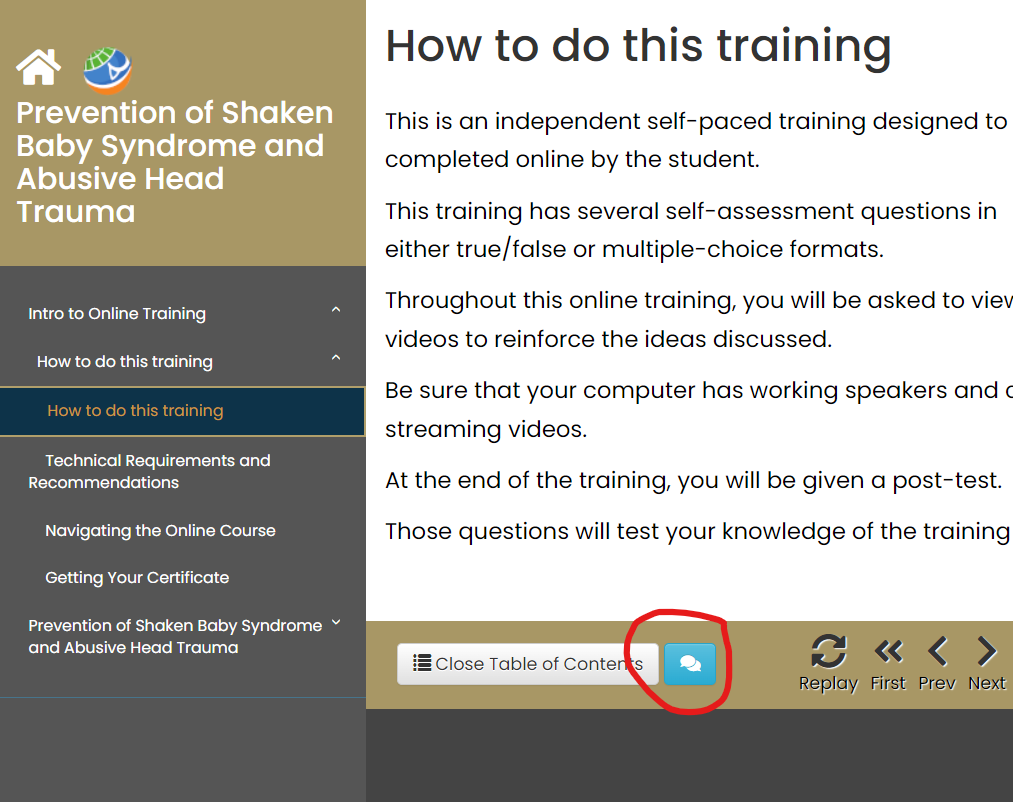
How does the "Contact Instructor" feature work?
Contact Instructor is a course-level messaging channel that lets learners send private messages to their instructor without leaving the learning environment. Messages and any attached files remain part of the course record and can be used to clarify assignment requirements, request extensions, or submit artifacts for formative review. Many LMS messaging systems also allow instructors to message selected learners or the entire class; whether messages generate email or app notifications depends on each learner's notification settings and institution-level controls. See guidance about Canvas and similar LMS messaging features here and Blackboard messaging options here for details on notification behavior and administrator settings.
When should learners message instructors?
Use Contact Instructor when a question or submission directly affects your learning plan, assignment completion, or understanding of feedback. Practical uses include:
- Asking for clarification on assignment criteria or deadlines.
- Requesting targeted feedback on a draft or a specific learning task.
- Notifying the instructor of evidence-based needs (for example, access issues or required accommodations).
- Sharing brief reflections that inform future instruction (e.g., "I tried strategy X; here's what happened").
- Confirming receipt of materials or asking for a re-send of handouts or rubrics.
When you message, be concise, reference the specific assignment/module, and attach only files the instructor needs to act on. This supports timely, actionable responses and models professional communication in an educational setting.
How can instructors use messaging to improve instruction and supervision?
Instructors can leverage Contact Instructor for low-burden formative assessment and to scaffold learning. Recommended strategies include:
- Sending individualized micro-feedback that highlights one or two actionable steps—this keeps responses focused and more likely to be applied.
- Using messaging to identify recurring misunderstandings; aggregate those into a short announcement or module clarification to reach the whole class.
- Inviting learners to submit short reflections or artifacts via message to inform subsequent lesson planning or coaching conversations.
- Embedding quick remediation resources or links to follow-up courses (for deeper practice). For example, learners who need support with lesson planning may be referred to Meaningful Lesson Planning for Infants/Toddlers Buy Now $24.00.
- Modeling professional communication and using messages as part of a mentoring relationship, as outlined in our Teacher Mentoring in ECE Buy Now $16.00 course.
When instructors use messages diagnostically—asking a clarifying question before responding, or requesting a short demonstration of understanding—they convert administrative exchanges into learning opportunities.
What notification and privacy practices should programs adopt?
Programs should establish transparent policies that clarify: how instructors will use course messaging, expected response times, what constitutes an appropriate message, and how long messages are retained. Because learners can modify notification preferences, instructors should tell learners how they will communicate (announcements vs. direct messages) and advise learners to adjust their notifications as needed. Technical and administrative controls vary by LMS; institutions can enable or restrict messaging functions at the course or system level, so confirm your program settings with your LMS administrator (Canvas guidance, Blackboard guidance).
Suggested policy items to share with learners and staff:
- Typical instructor response time (e.g., 48 business hours).
- Topics that should be messaged (assignment clarifications, accessibility requests) vs. those that should be submitted via other channels (formal appeals, complaints).
- How message content will be used (for coaching, evidence of completion, record keeping).
Where can I learn more or get help?
For practical steps on course registration or credential pathways referenced while using Course Instructor messages, see related ChildCareEd articles such as Pre-Requisites For Course Registration, details on how online training is helping classroom practice here, cost-saving tips including free CDA pathways How to Get a CDA for Free, and state-specific training guidance like How to Get an ECE Certificate in North Carolina and Child Development Classes in Texas. If you operate in Maryland or use MSDE vouchers, consult How to Apply for an MSDE Training Voucher for administrative assistance.
Summary: How can I get the most from Contact Instructor?
Use messaging deliberately: 1) Identify the specific learning need, 2) attach minimal supporting evidence, and 3) request actionable feedback. Instructors should respond with concise, prioritized steps and convert patterns in messages into class-level adjustments. To deepen your practice, consider the courses referenced above and the mentoring resources available within ChildCareEd.
#feedback #communication #assessment #professionaldevelopment #mentoring
- 45 Hour Child Growth and Development
- Many Colors, One Canvas: MD ECE Conference
- 45 Hour Preschool Methods and Materials
- Birth to Five CDA Credential with Portfolio Review
- 45 Hour Infant and Toddler Methods and Materials
- Pediatric RSV First Aid & CPR/AED
- 45 Hour School Age Methods and Materials
- CDA Bridge Bundle: Family Child Care without Portfolio Review
- CDA Bridge Bundle: Infant/Toddler without Portfolio Review
- CDA Bridge Bundle: Preschool without Portfolio Review
- Frequently Asked Questions
- Complete su capacitación CDA para visitantes domiciliarios hoy, un total de 120 horas por solo $288!
- Próximas Funciones para Nuestro Administrador de Grupo
- Why take CDA training with ChildCareEd? Free Resources
- Exploring ChildCareEd Subscription Options: Empowering Childcare Professionals
- Support Services from ChildCareEd for our Learners
- CDA Certification en Español: Recursos y Consejos para Educadores Bilingües
- Apoyo en Español para Capacitaciones Grupales Presenciales y por Zoom en Cursos Selectos
- ¿Cómo puedo obtener la certificación preescolar de 90 horas en Maryland?
- ¿Cuáles son los pasos, los requisitos y las opciones en línea para la certificación de 90 horas para cuidado escolar en Maryland?
- ¿Cuáles son los pasos, requisitos y opciones en línea para la certificación de 90 horas en cuidado de Infantes/Toddlers en Maryland?
- ¿Qué deben esperar los equipos de cuidado infantil del entrenamiento rápido en habilidades de primeros auxilios?
- ¿Cuáles son las mejores actividades de primeros auxilios para adultos?
- Cómo Ser Maestra de Preescolar en Texas
- Capacitación Previa al Servicio para Proveedores de Cuidado Infantil en Texas
- How can Michigan child care centers market themselves and fill open spots easily?
- Where can New York childcare providers find online infant safe sleep training that meets OCFS requirements?
- Horas de capacitación para daycare en Carolina del Norte: ¿cuántas necesita?
- How Can Technology Make Daily Family Communication Faster Without Making It Impersonal?
- How Can Child Care Directors Use AI to Reduce Administrative Work Responsibly?
