When observation notes pile up, the meaningful story of a child’s growth can get buried under the work of recording it. A simple, intentional digital workflow can help providers notice patterns, plan responsive experiences, and share useful updates without turning the classroom into a data-entry station. For practical training in objective observation and goal setting, explore ChildCareEd’s Tracking Progress, Shaping Futures: Observation & Assessment Skills  Buy Now $55.00; it offers deeper guidance for making documentation support teaching.
Why does thoughtful digital tracking matter?
Developmental tracking works best when it helps educators understand children, not simply produce a fuller record. A brief observation of a child negotiating a turn, experimenting with a puzzle, or telling a story can reveal strengths and interests across social-emotional, cognitive, language, and physical development. Seen over time, these moments can inform teaching decisions and make progress more visible to families.
Digital documentation can make records easier to search, organize, and share. Photos, short videos, audio, and concise written notes capture forms of learning that a checklist may miss. Research on digital documentation also cautions that moving to a screen does not automatically make assessment more inclusive: if platforms are designed mainly for adult reporting, children’s perspectives and diverse ways of expressing learning can be overlooked. The goal is not more data, but more useful evidence and reflection.
Used with intention, technology can reduce duplicate entry and help educators spend less time assembling folders and more time interacting with children. It should support professional judgment—not dictate what counts as development or turn children into scores. Keep the focus on each child’s #development, strengths, and next steps.
How can a digital workflow reduce paperwork in practice?
Start by mapping where staff currently record the same information: paper notes, classroom binders, spreadsheets, family messages, and end-of-term reports. Choose one repeated task to simplify first, such as anecdotal observations or portfolio updates. A single, shared system is often more useful than adding a new app while retaining every old form.
Use a short capture-and-review cycle: notice a meaningful moment, record a concise factual note, tag it for later retrieval, and review it during planning. Digital systems may offer timestamps, voice notes, photo captions, or report exports; use only features that save effort in your team’s actual routine. For instance, a note recorded once can inform a lesson plan and a family conversation, rather than being rewritten in separate places.
- Agree on one location for developmental observations and one brief template.
- Use tags sparingly, such as language, problem-solving, or peer interaction, so records remain searchable.
- Set a modest rotation for focused observations instead of expecting staff to document every child every day.
- Review whether the new process actually removes steps after a short pilot.
Digital documentation should remain behind the scenes: children’s play and relationships stay hands-on, while educators use technology to capture and reflect on learning.
What should educators record to make technology useful?
High-value records are brief, objective, and connected to context. Include when and where the moment occurred, what the child said or did, what materials or people were involved, and any adult support provided. Separate what was directly observed from your interpretation. “Jordan stacked five blocks, watched the tower fall, and tried a wider base” is more useful than “Jordan is good at building.”
Choose evidence that fits the moment. A short written note may be enough for a repeated self-help skill; a photo can show the stages of a construction project; audio may preserve a child’s explanation or a language sample. Use video selectively, with clear purpose and permission. Evidence can illuminate several areas at once: block play may involve spatial reasoning, language, persistence, and collaboration.
- Capture a small, representative sample rather than every activity.
- Include children’s words, gestures, drawings, and choices when relevant; learning is not expressed only through speech.
- Use developmental frameworks as guides for noticing, not rigid labels or peer-ranking scorecards.
- Review entries for clarity and factual language before sharing or using them for decisions.
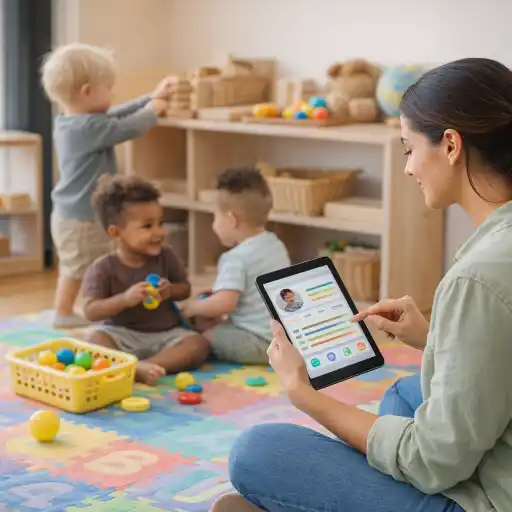
Documentation is partial by nature: educators select what to preserve. Deliberate selection can make records more equitable by including quiet, embodied, multilingual, and play-based demonstrations of competence. This reflects the value of portfolios and documentation as tools for making children’s thinking and learning visible.
How can directors choose tools and protect children’s privacy?
A platform is only a good fit if staff can use it without disrupting supervision or relationships. Ask educators to test a proposed tool during ordinary classroom routines and gather feedback before expanding its use. Consider whether it supports concise observations, flexible evidence, accessible family sharing, and straightforward exports. Avoid paying for complicated functions that your team will not use.
Privacy and security require active program practices as well as vendor features. Confirm what information is collected, who can see it, how consent is documented, how records can be exported or deleted, and what happens if the program stops using the service. Use role-based access where available, secure devices with individual logins, and avoid personal accounts or unsecured photo storage. Collect only information needed for care, assessment, or required records.
- Set clear written rules for capturing, storing, and sharing photos, audio, and video.
- Limit access to staff and family members who are authorized to view a child’s information.
- Train staff on passwords, device handling, consent, and what to do if information is sent to the wrong recipient.
- Maintain a backup and retention process consistent with program policy and applicable rules.
Digital tools do not guarantee compliance or confidentiality. Requirements differ by location and record type; state requirements vary - check your state licensing agency.
How can records guide teaching and strengthen family partnerships?
Documentation earns its place when it changes what educators do next. During a short team review, look for repeated interests, strategies, or barriers: Is a child trying new ways to solve a problem? Does participation change with group size, materials, language, or routine? Use those observations to adapt the environment, offer a new challenge, or decide what to observe again. A digital timeline can make patterns easier to notice, but human interpretation remains essential.
Share selected evidence with families in a strengths-based, understandable way. A concise update that describes a specific moment and invites a family perspective is often more meaningful than a stream of uncaptioned images. Ask what the child enjoys or communicates at home; family knowledge can enrich the picture and help educators recognize cultural and linguistic strengths.
- Describe a concrete observation before offering an interpretation.
- Invite families to add context, questions, or examples from home.
- Agree on a realistic next step, such as offering more opportunities for turn-taking or storytelling.
- Use screening or referral pathways when appropriate, and do not treat a digital record as a diagnosis.
For additional professional learning, the ChildCareEd courses Privacy Matters: Documentation and Observation in Early Learning Buy Now $55.00, Observing & Assessing in Child Care Buy Now $16.00, CDA: A Closer Look at Assessments Buy Now $24.00, and Culture, Communication, and Collaboration in Assessment Buy Now $55.00 address privacy, observation, assessment, and family partnership from complementary perspectives.
What common mistakes add work instead of reducing it?
Technology can create a second paperwork system if programs digitize every old form without deciding which records are necessary. It can also encourage over-documentation: staff may feel pressure to capture each activity, leaving less attention for children. A tool that is hard to navigate, duplicates data, or generates reports nobody uses is not streamlining the work.
- 📌 Trying to document everything: Focus on purposeful, rotating observations and a few representative samples.
- Keeping paper and digital processes indefinitely: Set a transition date for each process after testing the new workflow.
- Using vague or judgmental notes: Record observable actions and exact words; interpret separately.
- Sharing too much: Curate relevant updates, confirm permissions, and use privacy controls.
- Assuming automation understands development: Verify tags, summaries, and recommendations with educator judgment.
Choose one small improvement, such as a common note template or a weekly review, and ask staff whether it saves time while improving the quality of reflection. Their experience is essential evidence about whether the system works.
Conclusion: How can technology support progress without more paperwork?
Technology can help child care providers track developmental progress without creating extra paperwork when it simplifies existing work, captures authentic learning, and turns observations into responsive action. Select a manageable tool, use short objective notes and purposeful evidence, protect children’s information, and review records with colleagues and families. Most importantly, keep the device secondary to the relationships and play through which children learn.
The central question is not how many digital entries a program can produce, but whether its documentation helps educators see each child more clearly and decide what support or opportunity to offer next. Start with one workflow, evaluate its effect on staff time and teaching, and adjust as needed. For a deeper foundation in assessment and documentation, explore the linked ChildCareEd training options and confirm local recordkeeping requirements with your licensing agency.
- Teacher-Child Interactions for Stronger CLASS® Outcomes
- CDA Infants/Toddlers: Benefits to Observing
- CDA Bridge Bundle: Preschool
- CDA Bridge Bundle: Family Child Care
- CDA Bridge Bundle: Family Child Care without Portfolio Review
- CDA Bridge Bundle: Infant/Toddler without Portfolio Review
- CDA Bridge Bundle: Preschool without Portfolio Review
- CDA Bridge Bundle: Infant/Toddler
- Creating Environments that Nurture Growth and Community
- Texas Director Credential
- CDA Certification en Español: Recursos y Consejos para Educadores Bilingües
- 🎉Learning Comes to You: How to Schedule an Onsite Training for Your Team
- 🔍 ¿Qué ves cuando observas a un niño aprender?
- 💛🧩 ¿Cómo puedo hacer que mi enseñanza sea inclusiva para los niños con autismo?
- 10 Ejemplos de Cómo la Cultura Influye en el Desarrollo Infantil
- Proporciones de Cuidado Infantil y Tamaños de Grupo por Edad en Virginia (Guía Rápida para Centros y Hogares)
- ¿Cuál es la Diferencia Entre la Crianza Respetuosa y la Crianza Permisiva?
- Cómo Trabajar en el Cuidado Infantil en Carolina del Norte: Requisitos y Pasos
- Cómo Trabajar en el Cuidado Infantil en California: Requisitos y Pasos
- Celebrando la amistad en el cuidado infantil durante el Día de los Mejores Amigos
- Canciones, juegos y preguntas de círculo para niños
- Cómo simplificar la capacitación para sus empleados de daycare
- Classroom Management Technology: Tools and Best Practices
- How can North Dakota child care balance technology and play?
- How Can Technology Make Staff Training Faster, Fairer, and More Effective?
- How Can Child Care Providers Simplify 10 Everyday Tasks With AI?
- How Can Technology Track Children’s Development Without Creating More Paperwork?
- How Can Child Care Directors Use AI to Reduce Administrative Work Responsibly?
- How Can Child Care Programs Use Technology to Reduce Teacher Burnout?
- Personalized Learning in Preschool: Where Can Technology Help—and Where Should It Stop?
